Media tool
Photobank
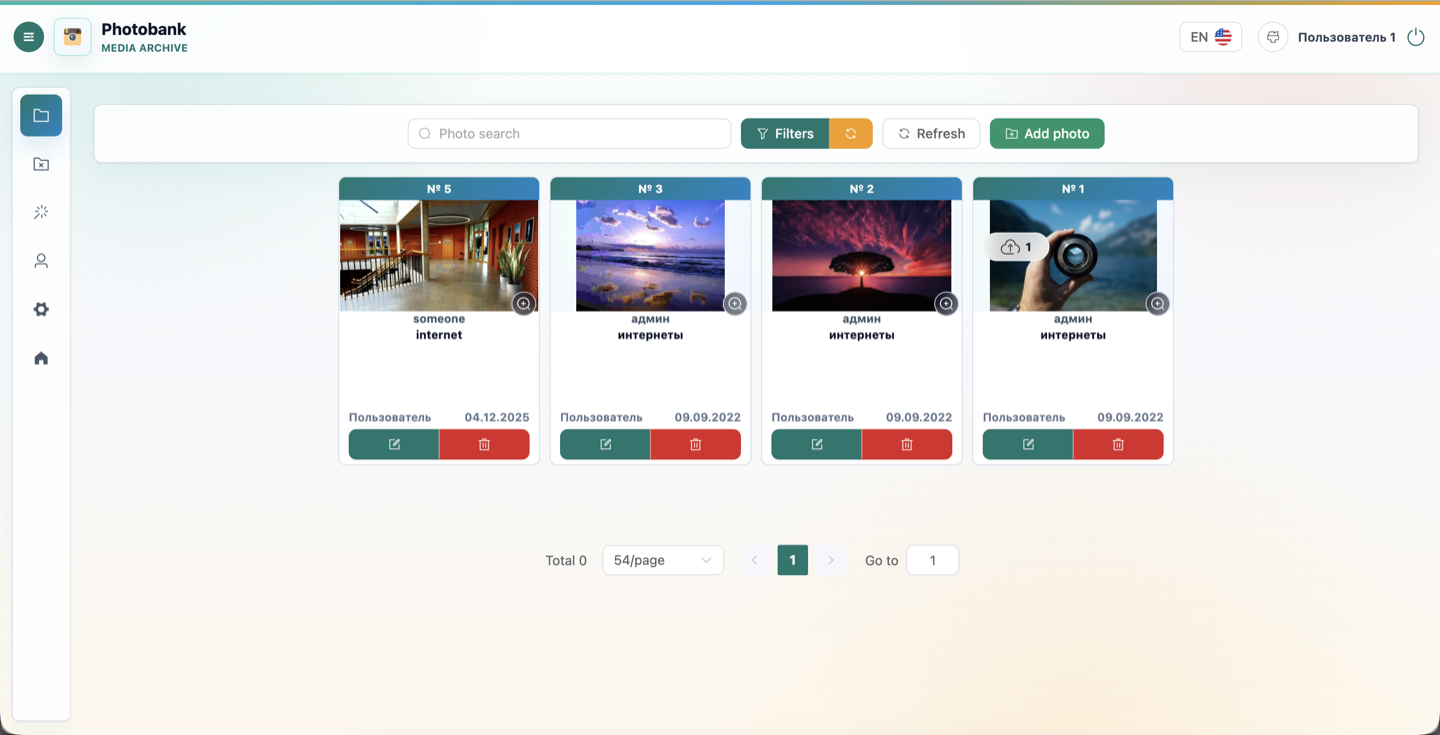
Photobank covers the path from raw upload to a ready media asset: images are uploaded in batches, edited, enriched with metadata and prepared for publication.
Inside
- Batch upload and preparation of images for publishing.
- Cataloging through tags, authors, sources and descriptions.
- Image processing pipeline and responsive asset generation.
Key points
50
files per upload
WebP
responsive versions
Meta
search and filters
Product view
Photobank
Photobank covers the path from raw upload to a ready media asset: images are uploaded in batches, edited, enriched with metadata and prepared for publication.
Functionality
Features
Batch upload
Files can be selected or dragged onto the page; GIF files are converted to a static image and unsupported types are filtered out.
Image editor
Before saving, users can crop, rotate, mirror and adjust brightness, contrast and saturation.
Catalog and filters
Search works by id, text, type, dates, tags, authors, sources, creators and excluded sources.
Trash and restore
Deletion is soft: images move to trash and can be restored when permissions allow it.
Workflow
User flow
- 01
Upload images
An operator adds up to 50 files through an uploader or drag-and-drop directly on the catalog page.
- 02
Prepare visuals
The image is cropped to the required format, rotated, mirrored and adjusted by basic parameters.
- 03
Assign metadata
For one file or a selected batch, type, tags, author, source, description and deletion date are filled in.
- 04
Save to catalog
The API creates full, desktop, tablet and mobile JPEG/WebP versions and stores actions in the log.
Under the hood
Technical side
Vue 3, Pinia, Element Plus
The UI is built around image cards, modal editor, filters, user tables and card settings.
Express + MySQL
The server checks permissions, stores metadata, logs operations and returns paginated lists with flexible field selection.
Sharp/Jimp pipeline
The processor generates multiple sizes, WebP versions, previews and applies watermark configs for aspect ratios.